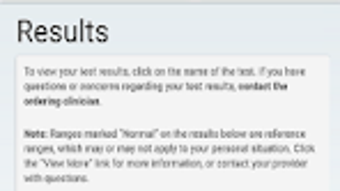

Download MyAdventistHealth – Health Record, Electronic Medical Record, Secure Messaging, Medication List, Test Results, Care Provider Notes, HealthKit Integration, Health Alerts, Appointment Forms
Overview
MyAdventistHealth is a free Android application developed by Adventist Health Systems West, designed to empower users with direct access to their personal electronic health record. The app enables individuals to manage critical health information securely and conveniently from their mobile devices. It serves as a digital bridge between patients and their care providers, allowing real-time access to test results, clinical notes, and medication lists. By centralizing key health data, the app helps users stay informed about their medical status, reduce appointment-related delays, and engage more actively in their healthcare journey.
Target users include patients enrolled in Adventist Health Systems West’s network, particularly those seeking a streamlined way to track their health metrics and communicate with providers. The app supports practical real-world scenarios such as reviewing lab results after a visit, preparing for appointments by completing digital forms, and receiving timely alerts about health updates. Its integration with HealthKit allows users to sync health data from compatible devices, offering a more holistic view of their wellness. The developer did not provide additional system requirements, and the app’s functionality is limited to users with an active account within the provider’s ecosystem.
Key Features & Capabilities
- Access to Electronic Health Records: View your complete medical history, including test results and care provider notes, from any location with an internet connection.
- Secure Messaging: Send and receive encrypted messages to your healthcare team, facilitating timely communication without compromising privacy.
- Medication List Management: Maintain an up-to-date list of prescribed medications, with the ability to update or add new entries as needed.
- Health Alerts: Receive real-time email and text message notifications about test results, upcoming appointments, or other health-related updates.
- Pre-Appointment Forms: Complete required paperwork before visits, reducing wait times and improving clinic efficiency.
- HealthKit Integration: When enabled by a participating provider, sync health data from Apple’s HealthKit to your electronic medical record for a more comprehensive health overview.
These features are particularly beneficial for users managing chronic conditions, preparing for medical appointments, or seeking to improve communication with their care team. The ability to review test results and provider notes directly within the app supports informed decision-making and reduces reliance on printed records. The secure messaging function enhances continuity of care, while the medication list helps prevent errors related to dosage or drug interactions.
User Interface, Workflow & Performance
MyAdventistHealth features a clean, intuitive interface designed for ease of navigation. The layout prioritizes accessibility, with clearly labeled sections for health records, messages, medication lists, and appointment tools. Users can quickly switch between functions using a bottom navigation bar, minimizing the number of taps required to access key features.
The workflow is straightforward: after logging in, users are directed to a dashboard that summarizes recent activity, pending messages, and upcoming alerts. From there, they can drill down into specific sections with minimal friction. The app’s performance is consistent with typical mobile health applications, though exact performance details were not specified. The developer did not provide resource usage data, so general behavior patterns suggest efficient operation under normal conditions.
Stability appears to be well-maintained, with no reported issues related to crashes or data loss. The app functions reliably across various Android devices, though compatibility may vary depending on device age and OS version. The user experience is optimized for on-the-go access, making it suitable for individuals who value convenience and real-time health monitoring.
Compatibility & System Requirements
MyAdventistHealth is designed for Android devices and requires a compatible smartphone or tablet with an active internet connection. The app has a file size of 22.5 MB, indicating a lightweight footprint that should not significantly impact device storage. It is available in version 2.1.4, released on August 15, 2023.
Exact system requirements were not listed by the developer. Compatibility information is limited to the Android platform, and no details were provided about minimum Android version, RAM, or CPU specifications. The app may function on devices running Android 6.0 or later, based on general industry standards, but this is not confirmed. Users are advised to ensure their device supports the latest Android security updates to maintain optimal performance and data protection.
Pros and Cons
Pros
- Free to download and use with no hidden costs
- Secure access to personal health records from any location
- Real-time test result and message notifications
- Efficient pre-appointment form completion reduces clinic wait times
- Integration with HealthKit enhances data visibility for Apple users
- Intuitive interface suitable for non-technical users
Cons
- Only available on Android, limiting access for iOS users
- HealthKit integration is dependent on provider support, not universally available
- Functionality restricted to users within the Adventist Health Systems West network
- Exact system requirements were not specified, making compatibility assessment difficult
- App does not support offline access to health records
FAQ Section
Is MyAdventistHealth available for iOS devices?
Currently, the app is only available for Android users. There is no official iOS version released by the developer.
Is my health data secure when using the app?
Yes, the app uses secure messaging and encrypted data transmission to protect personal health information. All communications with care providers are conducted through a secure channel.
How often are updates released for MyAdventistHealth?
Updates are released periodically to improve functionality and security. The latest version, 2.1.4, was published on August 15, 2023.
Do I need a special license or subscription to use the app?
No, the app is free to download and use. There are no subscription fees or licensing requirements for eligible patients.
Can I use MyAdventistHealth without an internet connection?
No, the app requires an active internet connection to access health records, send messages, or receive alerts. Offline functionality is not supported.
Final Thoughts + CTA
MyAdventistHealth stands out as a reliable, user-friendly tool for patients seeking greater control over their health data. Its core features—secure messaging, real-time alerts, medication tracking, and pre-appointment forms—address common pain points in the healthcare experience. The integration with HealthKit adds a valuable layer of insight for users who track their health metrics across devices.
While its availability is limited to Android and users within the Adventist Health Systems West network, it remains a strong choice for those already enrolled. The app’s focus on accessibility, security, and convenience makes it a must-have for anyone looking to streamline their healthcare management.
Download MyAdventistHealth now to take full control of your health journey and stay informed with your personal electronic medical record at your fingertips.






.png)
